back
Open Wireshark (see Cryillic’s Wireshark Room for instructions) and perform a TCP Connect scan against port 80 on the target, monitoring the results. Make sure you understand what’s going on. Deploy the
THM - nmap (practical part)
This writeup only included practical part of the room.
Does the target ip respond to ICMP echo (ping) requests (Y/N)?
To know this-
sudo nmap -PE 10.48.131.33
100% packet loss or no response means NO.
Answer: N
Perform an Xmas scan on the first 999 ports of the target – how many ports are shown to be open or filtered?
┌──(goblin㉿kali)-[~/Desktop]
└─$ nmap -p 1-999 -sX -Pn 10.48.131.33 -vv
Starting Nmap 7.98 ( https://nmap.org ) at 2026-01-30 15:12 -0500
Initiating Parallel DNS resolution of 1 host. at 15:12
Completed Parallel DNS resolution of 1 host. at 15:12, 0.50s elapsed
Initiating XMAS Scan at 15:12
Scanning 10.48.131.33 [999 ports]
XMAS Scan Timing: About 15.22% done; ETC: 15:15 (0:02:53 remaining)
XMAS Scan Timing: About 30.23% done; ETC: 15:15 (0:02:21 remaining)
XMAS Scan Timing: About 45.25% done; ETC: 15:15 (0:01:50 remaining)
XMAS Scan Timing: About 60.26% done; ETC: 15:15 (0:01:20 remaining)
XMAS Scan Timing: About 75.28% done; ETC: 15:15 (0:00:50 remaining)
Completed XMAS Scan at 15:15, 201.20s elapsed (999 total ports)
Nmap scan report for 10.48.131.33
Host is up, received user-set.
Scanned at 2026-01-30 15:12:18 EST for 201s
All 999 scanned ports on 10.48.131.33 are in ignored states.
Not shown: 999 open|filtered tcp ports (no-response)

Read data files from: /usr/share/nmap
Nmap done: 1 IP address (1 host up) scanned in 201.73 seconds
           Raw packets sent: 1998 (79.920KB) | Rcvd: 0 (0B)
Answer: 999
There is a reason given for this – what is it?
Note: The answer will be in your scan results. Think carefully about which switches to use – and read the hint before asking for help!
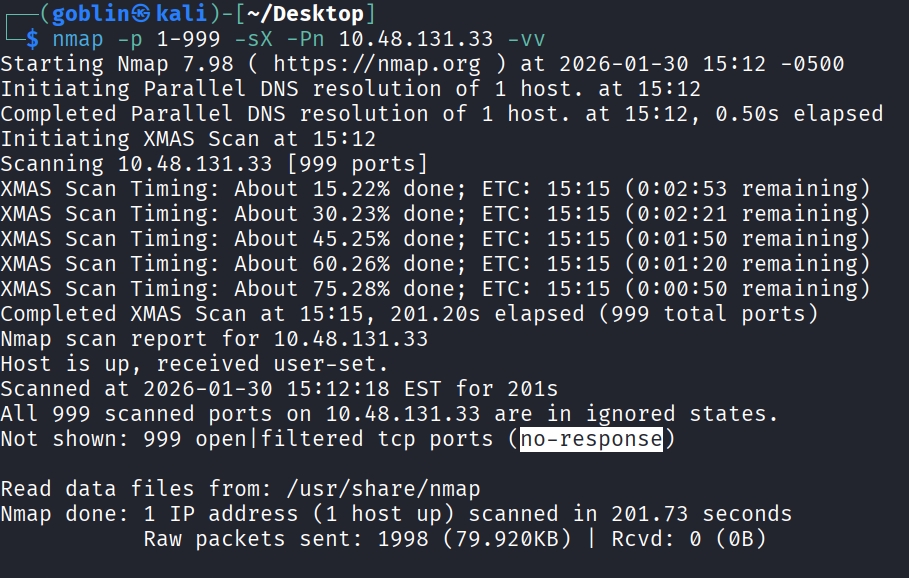
Answer: no response
Perform a TCP SYN scan on the first 5000 ports of the target – how many ports are shown to be open?
┌──(goblin㉿kali)-[~/Desktop]
└─$ sudo nmap -sS -p 1-5000 -vv -Pn 10.48.131.33
Host discovery disabled (-Pn). All addresses will be marked 'up' and scan times may be slower.
Starting Nmap 7.98 ( https://nmap.org ) at 2026-01-30 15:33 -0500
Initiating Parallel DNS resolution of 1 host. at 15:33
Completed Parallel DNS resolution of 1 host. at 15:33, 0.50s elapsed
Initiating SYN Stealth Scan at 15:33
Scanning 10.48.131.33 [5000 ports]
Discovered open port 53/tcp on 10.48.131.33
Discovered open port 3389/tcp on 10.48.131.33
Discovered open port 21/tcp on 10.48.131.33
Discovered open port 135/tcp on 10.48.131.33
Discovered open port 80/tcp on 10.48.131.33
Completed SYN Stealth Scan at 15:33, 14.43s elapsed (5000 total ports)
Nmap scan report for 10.48.131.33
Host is up, received user-set (0.039s latency).
Scanned at 2026-01-30 15:33:38 EST for 15s
Not shown: 4995 filtered tcp ports (no-response)
PORT     STATE SERVICE       REASON
21/tcp   open  ftp           syn-ack ttl 126
53/tcp   open  domain        syn-ack ttl 126
80/tcp   open  http          syn-ack ttl 126
135/tcp  open  msrpc         syn-ack ttl 126
3389/tcp open  ms-wbt-server syn-ack ttl 126

Read data files from: /usr/share/nmap
Nmap done: 1 IP address (1 host up) scanned in 14.96 seconds
           Raw packets sent: 10005 (440.220KB) | Rcvd: 15 (660B)
Answer: 5
Open Wireshark (see Cryillic’s Wireshark Room for instructions) and perform a TCP Connect scan against port 80 on the target, monitoring the results. Make sure you understand what’s going on. Deploy the ftp-anon script against the box. Can Nmap login successfully to the FTP server on port 21? (Y/N)
root@ip-10-48-170-166:~# nmap -p 21 --script=ftp-anon 10.48.131.33
Starting Nmap 7.80 ( https://nmap.org ) at 2026-01-30 21:08 GMT
mass_dns: warning: Unable to open /etc/resolv.conf. Try using --system-dns or specify valid servers with --dns-servers
mass_dns: warning: Unable to determine any DNS servers. Reverse DNS is disabled. Try using --system-dns or specify valid servers with --dns-servers
Nmap scan report for 10.48.131.33
Host is up (0.00013s latency).

PORT   STATE SERVICE
21/tcp open  ftp
| ftp-anon: Anonymous FTP login allowed (FTP code 230)
|_Can't get directory listing: TIMEOUT
MAC Address: 02:9B:93:58:4C:21 (Unknown)

Nmap done: 1 IP address (1 host up) scanned in 30.48 seconds
Yes, Nmap logged in successfully to the FTP server on port 21.
Answer: Y